
In short You do not need to become a cloud engineer to lead a migration. You need to know why you are moving, what is moving, what it will cost in naira, where your data will legally sit, and how you will know it worked. The three things that derail Nigerian cloud migrations most often are not technical: an unbudgeted bandwidth problem, an unexamined cross-border data transfer, and a cost comparison that left the generator out.
Cloud migration is no longer something only large technology companies think about. Nigerian SMEs, professional firms, financial businesses, retailers, schools, healthcare providers and growing startups are all moving applications, files and business systems off local servers.
For a business leader who is not deeply technical, the vocabulary alone makes it feel harder than it is. Virtual machines, SaaS, hybrid cloud, refactoring, egress — the terminology creates an impression that this is a decision only specialists can make.
It isn’t. The technical execution belongs to your IT team or your partner. The decisions belong to you, and they are business decisions: what problem are we solving, what will it cost, what could go wrong, and how will we know it worked.
This guide walks through the eight stages of a migration in business terms — including the three considerations specific to operating in Nigeria that most international guidance leaves out entirely.
First, the ten questions to ask before you approve anything
If you read nothing else here, take these into your next meeting. You do not need to understand the answers technically. You need your IT team or partner to be able to give them in business language — and if they cannot, the plan is not ready for approval.
- Why are we moving this particular system, and what improves when we do?
- What will it cost to migrate, and what will it cost every month afterwards?
- How does that compare with the full cost of keeping it where it is, including power?
- Where will our data physically be stored, and under which country’s jurisdiction?
- What is our lawful basis for transferring personal data outside Nigeria?
- How long will the initial data transfer take on our actual internet connection?
- What happens if the migration fails halfway, and how do we get back?
- Which other systems depend on this one, and what breaks if it moves?
- Who will have access to the data afterwards, and how is that reviewed?
- What specific measures will tell us in six months whether this worked?
Step 1: Start with the business problem, not the technology
The first question should never be which cloud provider to use. It should be what problem you are trying to solve.
Most migrations trace back to one of a familiar set of pressures: ageing servers, frequent downtime, storage running out, staff unable to work remotely, weak disaster recovery, slow applications, rising maintenance costs, or growth the current setup cannot absorb.
Name the pressure, then attach a number to it. Microsoft’s own adoption guidance makes the same point: define the business motivation and the desired outcome before choosing a migration strategy.
Weak objective: “We want to move to the cloud.”
Strong objective: “We want to cut server maintenance and power costs by 30% within a year, and let all 30 staff work securely from any location.”
The second version tells you what to migrate, in what order, and how you will know whether it worked. The first tells you nothing.
Step 2: Inventory what you have — and decide what actually moves
Before moving anything, list what exists: business applications, databases, files, email, physical servers, accounting software, customer records, websites, backups, network equipment and third-party integrations. For each one, record who owns it and how critical it is.
| System | Business importance | Current location | Migration priority |
| Customer database | Critical | Local server | High |
| Accounting software | High | Local server | High |
| Employee documents | Medium | Office PCs | Medium |
| Old archive files | Low | External drive | Low |
Then triage. Not everything should move, and deciding that deliberately is the difference between a migration and a mess. For each system, choose one of five outcomes:
Migrate — move it to the cloud broadly as it is.
Replace — retire it in favour of a cloud application that does the job better. Often the right answer for old accounting or file systems.
Modernise — redesign part of it so it works properly in the cloud rather than merely running there.
Retain — leave it where it is for now, deliberately and with a review date.
Retire — switch it off. Most businesses find at least one system nobody has used in two years.
The single most common mistake at this stage is attempting to move everything at once because it feels tidier. It isn’t. It concentrates all the risk into one window.
Step 3: Choose your cloud model
There are three broad models, and for most Nigerian SMEs the choice is more obvious than the terminology suggests.
| Model | What it means | Usually right when |
| Public cloud | Shared infrastructure from Microsoft Azure, Google Cloud or AWS | You want scale without owning hardware — the default for most SMEs |
| Private cloud | Infrastructure dedicated to your organisation alone | Regulatory or contractual obligations require isolation, and you have the budget and skills |
| Hybrid | Some systems stay on-premise, others move | You have a system that genuinely cannot move yet, or you want to migrate gradually |
Hybrid is frequently the honest answer for established Nigerian businesses — not as a permanent architecture, but as a transition state while a legacy application is replaced or retired. Be clear which it is. A hybrid setup adopted as a transition has an end date; one adopted by accident becomes two environments to secure, patch and pay for indefinitely.
Step 4: Work out what it really costs
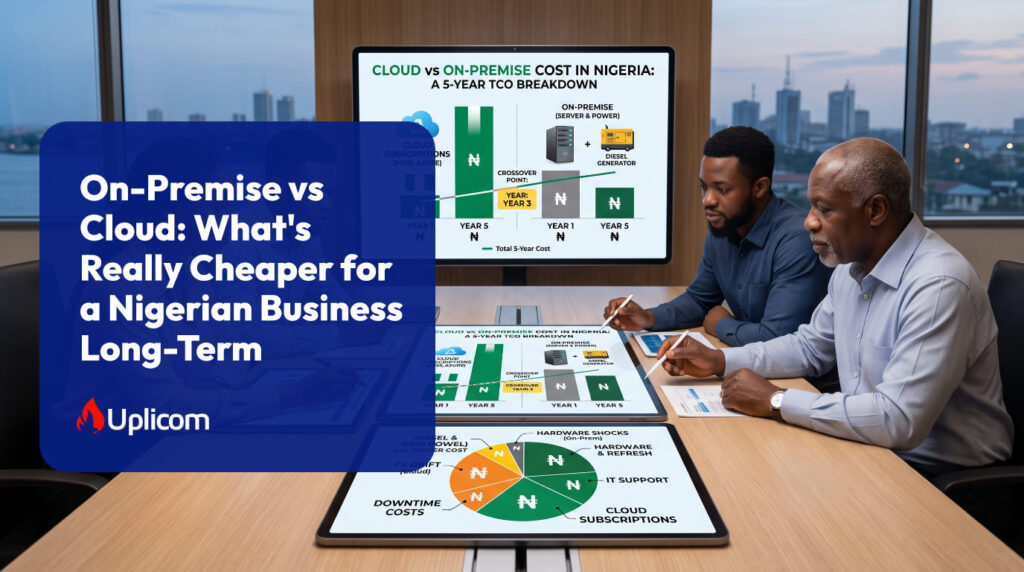
The most common assumption about cloud is that it is automatically cheaper. It isn’t. What it does is change the shape of the cost — from large occasional capital purchases to a continuous operating expense that scales with usage.
A complete comparison has to include, on the cloud side: subscriptions, storage, compute, software licences, connectivity, backup, security tooling, the migration project itself, training, monitoring and support. And on the on-premise side, the costs that rarely make it onto an IT budget at all.
The cost most comparisons omit: power
International guidance assumes reliable mains electricity. Nigerian businesses cannot, and this materially changes the arithmetic.
Take a server room drawing roughly 2kW between equipment and cooling, a generator running eight hours a day across twenty-two working days, and a generator producing about three kilowatt-hours per litre of diesel. That is around 117 litres a month attributable to IT alone — near ₦200,000 monthly at ₦1,700 per litre, or about ₦2.4 million a year. Over a three-year hardware cycle, roughly ₦7 million in fuel that never appears on the technology budget because it sits inside generator running costs.
Diesel prices vary widely by state and have moved sharply through 2026, so run the arithmetic at your own rate, load and runtime. The structure of the conclusion holds regardless of the exact figure: on-premise infrastructure in Nigeria carries a recurring energy cost that cloud infrastructure does not, and leaving it out makes cloud look more expensive than it is.
Access our Cloud Migration Cost Calculator — you can enter your own servers, generator hours, diesel price and headcount for a three-year comparison in naira.
Foreign exchange works against you here
Cloud pricing is denominated in dollars and often billed on consumption. That means your monthly cost can move for two independent reasons — your usage changed, or the naira did. On-premise capital expenditure, whatever else is wrong with it, does not reprice itself after purchase.
This is a real argument against cloud and worth stating plainly. It is also manageable: licensing bought through a Microsoft Cloud Solution Provider like Uplicom can be invoiced in naira, which removes both the exchange-rate surprise and the failed international card payment at renewal.
Learn More about our Microsoft 365 Enterprise and Business licensing — Uplicom invoices Microsoft licensing in naira for Nigerian businesses.
Ask about the cost of leaving
Providers charge to move data out. Egress fees are rarely material during normal operation and can be significant if you later migrate to a different provider or repatriate a large dataset. Ask what it would cost to extract everything before you commit, not after. A provider that cannot answer that clearly has told you something useful.
Step 5: Plan around Nigerian bandwidth, not advertised bandwidth
This is the stage that surprises businesses most, and it is almost entirely absent from international migration guides because it is not a problem in the markets they were written for.
Moving data to the cloud requires actually transmitting it. On a 50 Mbps connection, and assuming you achieved the full rated speed continuously — which you will not — five terabytes would take somewhere around nine days of uninterrupted transfer. Real conditions involve contention, outages and a business still trying to use the same connection for its daily work.
The practical consequences for your plan:
- Measure your genuine sustained upload speed before committing to a timeline, not the figure on the contract
- Sequence large historical archives separately from live working data, and move them first
- Schedule bulk transfer outside working hours, or on a dedicated link, so the migration does not degrade the business while it runs
- For genuinely large datasets, ask about physical transfer appliances — and ask early, because importing hardware into Nigeria adds lead time that belongs in the project plan
- Budget for the connectivity upgrade the cloud environment will need afterwards, which is a permanent cost rather than a migration cost
A migration timeline that ignores bandwidth is not a timeline. It is an estimate of how long the work would take somewhere else.
Step 6: Know where your data will live, and what the law requires
There is no major cloud region inside Nigeria. Whichever provider you choose, your workloads will run from somewhere else — most commonly South Africa, Western Europe or the Middle East, depending on the provider and service.
That has two consequences your plan has to address.
Performance
Distance introduces latency. For email, file storage and most SaaS applications this is imperceptible. For applications that make frequent back-and-forth calls to a database — some legacy line-of-business and accounting systems in particular — it can be the difference between an application that feels normal and one staff complain about daily. Test the specific application before you commit, rather than assuming.
Compliance
A cloud migration involving personal data is a cross-border transfer, whether or not anyone in the project describes it that way.
The Nigeria Data Protection Act 2023 governs this, and its General Application and Implementation Directive came into force on 19 September 2025, replacing the older NDPR framework as the operative instrument. Personal data may only leave Nigeria on a recognised lawful basis. Higher-risk processing — which the deployment of significant new technology generally is — attracts a requirement for a data protection impact assessment. Enforcement carries administrative sanctions assessed against a fixed sum or a percentage of annual gross revenue, whichever is higher.
Handle this during planning, not after go-live. The practical steps are unglamorous and entirely achievable: identify what personal data is in scope, establish and document your lawful basis for the transfer, complete a DPIA, check what your provider’s contractual terms actually commit to, and record the decision. Doing it afterwards means doing it under pressure, with the data already moved.
Your provider’s security certifications are not a substitute for any of this. They describe the provider’s obligations. Yours remain yours.
Step 7: Design security in from the start
Moving data to the cloud does not transfer responsibility for protecting it. Both major providers operate a shared responsibility model: they secure the infrastructure, you secure your data, identities and configuration. Most cloud security incidents originate on the customer’s side of that line — usually misconfiguration or compromised credentials rather than a failure of the platform.
Before migration, establish what data you hold, who may access it, how it will be encrypted, how backups will run, how accounts will be secured, how access is removed when someone leaves, and how incidents will be detected and handled.
The baseline for a business of any size:
- Multi-factor authentication on every account, with no exemption for senior staff
- Identity and access management with role-based permissions
- Encryption in transit and at rest
- Backups held separately from the production environment, and restored periodically to prove they work
- Endpoint protection across company devices
- Logging and monitoring, configured deliberately rather than left at defaults
- A written incident response procedure, including who notifies the NDPC and within what timeframe
Learn more about our cybersecurity solutions
Step 8: Pilot, stage the rollout, and keep a way back
Do not make your most critical system the first thing you migrate.
Start with a low-risk workload — a document repository, an internal service, a development environment, a defined set of company files. The objective is not to save time. It is to learn what your specific environment does under migration conditions: compatibility problems, connectivity limits, permission surprises and costs nobody forecast.
A workable sequence
- Assessment — systems, data, dependencies, risks
- Planning — target environment, costs, responsibilities, compliance position
- Pilot — one low-risk workload, moved and tested properly
- Migration — remaining workloads in controlled batches
- Validation — performance, security, availability, data integrity confirmed
- Optimisation — remove waste, right-size what was over-provisioned
- Decommissioning — retire old infrastructure once you are genuinely confident
The rollback plan
Never migrate critical data without a documented answer to a single question: what happens if this fails? Your plan should specify what is backed up, where those backups sit, how they have been tested, who is authorised to restore, how long recovery should take, and how the business returns to the previous environment if that becomes necessary.
Keep the old environment running until validation is complete. Decommissioning early to save a month of costs is how businesses discover which dependency nobody documented.
A backup that has never been restored is not a disaster recovery plan. It is an assumption.
Bring your people with you
Cloud migration is not only an IT project. Before migration, staff save documents to a local server. Afterwards, they access them through a cloud platform with account-based permissions. That changes how people work, and if nobody explains why, a meaningful number will simply revert to whatever workaround they can find.
Train on the new applications, MFA and password requirements, file management, remote access, collaboration tools and how to report problems. Explain the reasoning, not just the mechanics. Adoption failure and technical failure produce identical outcomes on a balance sheet.
Read Insight: 5 Signs You’ve Outgrown Your IT Setup — if staff are already working around your systems, that is worth resolving before you migrate rather than after.
After go-live: measure it, then keep managing it
A migration is not successful because the data is now in the cloud. It is successful if the business measures it agreed on at the start have moved.
Set these before you migrate, so there is a baseline to compare against: downtime, application performance, IT maintenance hours, backup reliability, infrastructure cost, whether staff can genuinely work securely from anywhere, and how quickly the business can scale.
Then treat the cloud environment as an operating model rather than a completed project. Monitor spending, user access, security posture, performance, storage growth, backups, availability and compliance on a schedule. Cloud environments become expensive quietly — resources get created for a purpose, the purpose ends, and nobody switches them off. Routine optimisation frequently recovers more money than the migration saved in its first year.
What we see in practice
Observation 1: Cloud Cost Optimisation Often Delivers More Immediate Value Than Migration Itself
In a Microsoft 365 partner-to-partner migration for a multi-location real estate solutions company with more than 100 users, we discovered that the migration was only part of the challenge. The organisation had accumulated multiple Azure services over time, but there was limited visibility into which resources were actively supporting business operations and which were simply consuming budget.
A detailed assessment revealed that several workloads did not require cloud infrastructure and could be more efficiently hosted on traditional web hosting platforms with predictable annual costs. By moving these workloads off Azure while retaining business-critical applications such as accounting and HR systems in Azure, the company significantly simplified its environment and improved cost visibility.
A notable lesson from this project was that the customer’s Azure subscription was billed through a dollar-denominated payment method. Exchange rate fluctuations and limited visibility into resource consumption made monthly costs difficult to predict. For many Nigerian organisations, cloud optimisation and governance can deliver immediate financial benefits before any major migration activity begins.
Key takeaway: Before migrating, businesses should understand exactly what is running in their cloud environment, what business purpose each workload serves, and whether every workload genuinely requires cloud infrastructure.
Observation 2: The True Scope of a Microsoft 365 Migration Is Often Discovered During the Project
During a tenant-to-tenant Microsoft 365 migration for the Nigerian outlet of a food processing and manufacturing company operating across multiple countries, the initial assessment suggested a relatively straightforward migration involving: 26 user mailboxes, 26 OneDrive accounts, 2 SharePoint sites, 15 Microsoft Teams environments, 2 Power Automate flows
However, once migration activities began, additional Microsoft Power Platform components and dependencies were identified that had not been visible during the initial discovery phase. These workloads required separate migration planning and, in some cases, additional third-party migration licences.
One of the realities of complex Microsoft 365 environments is that not every object can be identified during the assessment stage. Some dependencies only become visible once detailed migration analysis is underway. This means that migration costs and timelines may need to be adjusted as new workloads are discovered.
Key takeaway: Organisations should budget contingency funds for Microsoft 365 migrations. It is common for additional workloads, particularly Power Platform assets, automations, integrations, and permissions structures, to emerge during execution rather than during initial assessment.
Observation 3: Source Systems Must Be Kept Operational Until Migration Is Complete
In a web server business email-to-Google Workspace migration for an education-sector organisation with three mailboxes with more than 10 years of data, the technical migration itself was relatively simple. However, an important dependency emerged during execution: the source mailboxes had to remain active and accessible throughout the migration process because authentication to the source platform was required to transfer mailbox content into Google Workspace.
Had the customer cancelled or disabled the original mailboxes before migration completion, mailbox data could not have been accessed for transfer.
While this example involved only a small number of users, the lesson applies equally to larger migrations. Organisations sometimes assume they can immediately discontinue legacy services once a migration project begins, only to discover that access to the source environment is still required for validation, authentication, data transfer, or rollback planning.
Key takeaway: Do not decommission or cancel legacy email, hosting, or cloud services until all migration activities, validation checks, and user acceptance testing have been completed successfully.
The bottom line
Cloud migration can give a Nigerian business real flexibility, resilience and access to technology that would be uneconomic to own. Moving because everyone else is moving is not a strategy.
Start with the business objective. Understand what you actually have. Cost it honestly, including the diesel. Establish where the data will sit and on what legal basis. Migrate in stages, with a way back. Then measure whether it worked.
Your role as a non-technical leader is not to design the architecture. It is to make sure the technology serves the business instead of becoming another thing the business has to manage.
Frequently asked questions
How long does a cloud migration take for a Nigerian SME?
For a business of around 30 people moving email, file storage and identity, six to ten weeks is a realistic range from assessment to decommissioning. Line-of-business applications, large historical archives or limited upload bandwidth extend it considerably. Any timeline produced without measuring your actual connection speed is guesswork.
Is cloud actually cheaper than on-premise in Nigeria?
Frequently yes, but not automatically, and not for the reason people expect. The comparison usually turns on power: once generator fuel for servers and cooling is counted, on-premise infrastructure costs substantially more than its budget line suggests. Run the numbers with your own figures rather than accepting either answer as a general rule.
Where will my data be stored if I move to the cloud?
Outside Nigeria. There is no major cloud region in the country, so workloads run from South Africa, Europe or the Middle East depending on provider and service. Your provider can confirm the specific region, and you should have that in writing before migrating personal data.
Does the NDPA allow storing Nigerian customer data abroad?
Yes, on a recognised lawful basis. The Act and the General Application and Implementation Directive that took effect on 19 September 2025 regulate cross-border transfers rather than prohibiting them. The obligation is to establish, document and be able to demonstrate your basis — which is straightforward during planning and awkward afterwards.
What is the biggest cause of failed cloud migrations?
In our experience it is rarely the technology. It is migrating without a tested rollback plan, discovering an undocumented dependency mid-cutover, or completing the technical work successfully while staff carry on using the old workarounds because nobody explained the change.
Should we move everything at once?
Almost never. Staged migration concentrates less risk in any single window, gives you a chance to learn from a low-stakes workload first, and lets you stop if something is wrong. The exception is a business small enough that everything is one workload.
| Work with Uplicom to plan and run migration for your Nigerian business — assessment, compliance position, staged execution and the training that makes it stick. Book a free migration scoping call and we will tell you what your migration actually involves, whether or not you work with us. → Book a migration scoping call |